Dynamics 365 Integration Patterns: REST API, OData, Web API, and Azure Service Bus
## OAuth 2.0 Token Acquisition
**C# with MSAL.NET:**
```csharp
using Microsoft.Identity.Client;
public class DataverseAuthHelper
{
```csharp
private readonly string _clientId;
private readonly string _clientSecret;
private readonly string _tenantId;
private readonly string _resource;
public DataverseAuthHelper(string clientId, string clientSecret, string tenantId, string instanceUrl)
{
_clientId = clientId;
_clientSecret = clientSecret;
_tenantId = tenantId;
_resource = instanceUrl;
}
public async Task<string> GetAccessTokenAsync()
{
var app = ConfidentialClientApplicationBuilder
.Create(_clientId)
.WithClientSecret(_clientSecret)
.WithAuthority(new Uri($"https://login.microsoftonline.com/{_tenantId}"))
.Build();
var scopes = new[] { $"{_resource}/.default" };
var result = await app.AcquireTokenForClient(scopes)
.ExecuteAsync();
return result.AccessToken;
}```
}
// Usage
var authHelper = new DataverseAuthHelper(
```yaml
clientId: "your-client-id",
clientSecret: "your-client-secret",
tenantId: "your-tenant-id",
instanceUrl: "https://org.crm.dynamics.com"```
);
var token = await authHelper.GetAccessTokenAsync();
JavaScript with MSAL.js:
import * as msal from "@azure/msal-node";

const config = {
```yaml
auth: {
    clientId: "your-client-id",
    authority: "https://login.microsoftonline.com/your-tenant-id",
    clientSecret: "your-client-secret"
}```
};

const cca = new msal.ConfidentialClientApplication(config);

const tokenRequest = {
```yaml
scopes: ["https://org.crm.dynamics.com/.default"]```
};

async function getAccessToken() {
```javascript
try {
    const response = await cca.acquireTokenByClientCredential(tokenRequest);
    return response.accessToken;
} catch (error) {
    console.error("Error acquiring token:", error);
    throw error;
}```
}
Dataverse Web API - CRUD Operations
Create Record
POST request:
POST https://org.crm.dynamics.com/api/data/v9.2/accounts HTTP/1.1
Authorization: Bearer {access_token}
Content-Type: application/json
OData-MaxVersion: 4.0
OData-Version: 4.0
Accept: application/json
Prefer: return=representation

{
  "name": "Contoso Ltd",
  "telephone1": "+1-425-555-0100",
  "address1_city": "Seattle",
  "address1_stateorprovince": "WA",
  "address1_country": "USA",
  "revenue": 5000000,
  "numberofemployees": 150,
  "industrycode": 1,
  "primarycontactid@odata.bind": "/contacts(guid-of-contact)"
}
C# implementation:
public async Task<Guid> CreateAccountAsync(string accessToken, Account account)
{
```csharp
using var client = new HttpClient();
client.DefaultRequestHeaders.Authorization =
    new AuthenticationHeaderValue("Bearer", accessToken);
client.DefaultRequestHeaders.Add("OData-MaxVersion", "4.0");
client.DefaultRequestHeaders.Add("OData-Version", "4.0");
client.DefaultRequestHeaders.Add("Prefer", "return=representation");

var accountData = new
{
    name = account.Name,
    telephone1 = account.Phone,
    address1_city = account.City,
    revenue = account.Revenue,
    primarycontactid_odata_bind = $"/contacts({account.PrimaryContactId})"
};

var content = new StringContent(
    JsonSerializer.Serialize(accountData),
    Encoding.UTF8,
    "application/json"
);

var response = await client.PostAsync(
    "https://org.crm.dynamics.com/api/data/v9.2/accounts",
    content
);

response.EnsureSuccessStatusCode();

var entityUri = response.Headers.GetValues("OData-EntityId").First();
var guidMatch = Regex.Match(entityUri, @"\(([^)]+)\)");

return Guid.Parse(guidMatch.Groups[1].Value);```
}
Retrieve Record
GET request with selected fields:
GET https://org.crm.dynamics.com/api/data/v9.2/accounts(guid)?$select=name,revenue,telephone1&$expand=primarycontactid($select=fullname,emailaddress1) HTTP/1.1
Authorization: Bearer {access_token}
OData-MaxVersion: 4.0
OData-Version: 4.0
Accept: application/json
Response:
{
  "@odata.context": "https://org.crm.dynamics.com/api/data/v9.2/$metadata#accounts(name,revenue,telephone1,primarycontactid(fullname,emailaddress1))/$entity",
  "@odata.etag": "W/\"12345678\"",
  "name": "Contoso Ltd",
  "revenue": 5000000.00,
  "telephone1": "+1-425-555-0100",
  "accountid": "guid",
  "primarycontactid": {
```text
"fullname": "John Doe",
"emailaddress1": "john@contoso.com",
"contactid": "contact-guid"```
  }
}
Update Record
PATCH request:
PATCH https://org.crm.dynamics.com/api/data/v9.2/accounts(guid) HTTP/1.1
Authorization: Bearer {access_token}
Content-Type: application/json
OData-MaxVersion: 4.0
OData-Version: 4.0
If-Match: *

{
  "telephone1": "+1-425-555-0200",
  "revenue": 7500000
}
Upsert pattern (update or insert):
PATCH https://org.crm.dynamics.com/api/data/v9.2/accounts(guid) HTTP/1.1
If-None-Match: null
Prefer: return=representation

{
  "name": "Contoso Ltd",
  "telephone1": "+1-425-555-0100"
}
Delete Record
DELETE request:
DELETE https://org.crm.dynamics.com/api/data/v9.2/accounts(guid) HTTP/1.1
Authorization: Bearer {access_token}
OData-MaxVersion: 4.0
OData-Version: 4.0
OData Queries
Filtering
Comparison operators:
## Equal
GET /api/data/v9.2/accounts?$filter=revenue eq 5000000
## Greater than
GET /api/data/v9.2/accounts?$filter=revenue gt 1000000
## Less than or equal
GET /api/data/v9.2/accounts?$filter=numberofemployees le 100
## Not equal
GET /api/data/v9.2/accounts?$filter=statecode ne 1
## Logical AND
GET /api/data/v9.2/accounts?$filter=revenue gt 1000000 and address1_stateorprovince eq 'WA'
## Logical OR
GET /api/data/v9.2/accounts?$filter=address1_city eq 'Seattle' or address1_city eq 'Redmond'
## Contains (string)
GET /api/data/v9.2/accounts?$filter=contains(name, 'Contoso')
## Starts with
GET /api/data/v9.2/accounts?$filter=startswith(name, 'A')
## Date comparison
GET /api/data/v9.2/accounts?$filter=createdon gt 2025-01-01T00:00:00Z
Advanced Filtering
FetchXML-style filters in OData:
## IN operator (multiple values)
GET /api/data/v9.2/accounts?$filter=Microsoft.Dynamics.CRM.In(PropertyName='address1_stateorprovince',PropertyValues=['WA','CA','NY'])
## Between dates
GET /api/data/v9.2/accounts?$filter=createdon ge 2025-01-01T00:00:00Z and createdon le 2025-12-31T23:59:59Z
## LastXDays
GET /api/data/v9.2/accounts?$filter=Microsoft.Dynamics.CRM.LastXDays(PropertyName='createdon',PropertyValue=30)
## Today
GET /api/data/v9.2/tasks?$filter=Microsoft.Dynamics.CRM.Today(PropertyName='scheduledend')
## On or After (fiscal year)
GET /api/data/v9.2/opportunities?$filter=Microsoft.Dynamics.CRM.OnOrAfter(PropertyName='estimatedclosedate',PropertyValue='FiscalYear')
Ordering, Pagination, and Expansion
Complex query:

GET /api/data/v9.2/accounts?$select=name,revenue,createdon&$filter=revenue gt 1000000&$orderby=revenue desc&$top=10&$expand=primarycontactid($select=fullname,emailaddress1),createdby($select=fullname)
Server-side pagination:
public async Task<List<Account>> GetAllAccountsAsync(string accessToken)
{
```csharp
var accounts = new List<Account>();
var nextLink = "https://org.crm.dynamics.com/api/data/v9.2/accounts?$select=name,revenue&$top=5000";

using var client = new HttpClient();
client.DefaultRequestHeaders.Authorization =
    new AuthenticationHeaderValue("Bearer", accessToken);
client.DefaultRequestHeaders.Add("OData-MaxVersion", "4.0");
client.DefaultRequestHeaders.Add("Prefer", "odata.maxpagesize=5000");

while (!string.IsNullOrEmpty(nextLink))
{
    var response = await client.GetAsync(nextLink);
    response.EnsureSuccessStatusCode();

    var json = await response.Content.ReadAsStringAsync();
    var result = JsonSerializer.Deserialize<ODataResponse<Account>>(json);

    accounts.AddRange(result.Value);

    nextLink = result.ODataNextLink;
}

return accounts;```
}
Aggregation
Count records:
GET /api/data/v9.2/accounts/$count?$filter=revenue gt 1000000
Aggregate functions:
## Sum
GET /api/data/v9.2/opportunities?$apply=aggregate(estimatedvalue with sum as totalvalue)
## Average
GET /api/data/v9.2/opportunities?$apply=aggregate(estimatedvalue with average as avgvalue)
## Group by and count
GET /api/data/v9.2/accounts?$apply=groupby((address1_stateorprovince),aggregate($count as total))
Batch Operations
ExecuteMultiple Pattern
Batch create/update:
POST https://org.crm.dynamics.com/api/data/v9.2/$batch HTTP/1.1
Content-Type: multipart/mixed;boundary=batch_AAA123
Authorization: Bearer {access_token}
OData-MaxVersion: 4.0
OData-Version: 4.0

--batch_AAA123
Content-Type: multipart/mixed;boundary=changeset_BBB456

--changeset_BBB456
Content-Type: application/http
Content-Transfer-Encoding: binary
Content-ID: 1

POST /api/data/v9.2/accounts HTTP/1.1
Content-Type: application/json

{
  "name": "Account 1",
  "revenue": 1000000
}

--changeset_BBB456
Content-Type: application/http
Content-Transfer-Encoding: binary
Content-ID: 2

POST /api/data/v9.2/accounts HTTP/1.1
Content-Type: application/json

{
  "name": "Account 2",
  "revenue": 2000000
}

--changeset_BBB456--
--batch_AAA123--
C# batch helper:
public async Task<List<Guid>> CreateAccountsBatchAsync(string accessToken, List<Account> accounts)
{
```csharp
var batchId = $"batch_{Guid.NewGuid()}";
var changesetId = $"changeset_{Guid.NewGuid()}";

var batchContent = new StringBuilder();
batchContent.AppendLine($"--{batchId}");
batchContent.AppendLine($"Content-Type: multipart/mixed;boundary={changesetId}");
batchContent.AppendLine();

int contentId = 1;
foreach (var account in accounts)
{
    batchContent.AppendLine($"--{changesetId}");
    batchContent.AppendLine("Content-Type: application/http");
    batchContent.AppendLine("Content-Transfer-Encoding: binary");
    batchContent.AppendLine($"Content-ID: {contentId++}");
    batchContent.AppendLine();
    batchContent.AppendLine("POST /api/data/v9.2/accounts HTTP/1.1");
    batchContent.AppendLine("Content-Type: application/json");
    batchContent.AppendLine();
    batchContent.AppendLine(JsonSerializer.Serialize(new {
        name = account.Name,
        revenue = account.Revenue
    }));
    batchContent.AppendLine();
}

batchContent.AppendLine($"--{changesetId}--");
batchContent.AppendLine($"--{batchId}--");

using var client = new HttpClient();
client.DefaultRequestHeaders.Authorization =
    new AuthenticationHeaderValue("Bearer", accessToken);

var content = new StringContent(
    batchContent.ToString(),
    Encoding.UTF8,
    $"multipart/mixed;boundary={batchId}"
);

var response = await client.PostAsync(
    "https://org.crm.dynamics.com/api/data/v9.2/$batch",
    content
);

// Parse batch response to extract created GUIDs
var responseContent = await response.Content.ReadAsStringAsync();
// ... parsing logic ...

return new List<Guid>(); // Return extracted GUIDs```
}
Change Tracking
Delta Queries

Initial query:
GET /api/data/v9.2/accounts?$select=name,revenue,modifiedon
Prefer: odata.track-changes
Response includes delta link:
{
  "@odata.context": "...",
  "@odata.deltaLink": "https://org.crm.dynamics.com/api/data/v9.2/accounts?$select=name,revenue,modifiedon&deltatoken=919042%2108%2f22%2f2017%2008%3a10%3a44",
  "value": [...]
}
Subsequent delta query:
GET /api/data/v9.2/accounts?$select=name,revenue,modifiedon&deltatoken=919042%2108%2f22%2f2017%2008%3a10%3a44
Response includes only changes:
{
  "@odata.context": "...",
  "@odata.deltaLink": "...(new-token)...",
  "value": [
```json
{
  "name": "Updated Account",
  "revenue": 1500000,
  "accountid": "guid"
},
{
  "@odata.context": "...",
  "@odata.removed": {
    "reason": "deleted"
  },
  "accountid": "deleted-guid"
}```
  ]
}
Webhooks
Service Endpoint Registration
Create webhook endpoint:
public void RegisterWebhook(IOrganizationService service, string webhookUrl)
{
```sql
// Create Service Endpoint
var endpoint = new Entity("serviceendpoint");
endpoint["name"] = "Account Change Webhook";
endpoint["namespacename"] = "https://myapp.azurewebsites.net/api/webhook";
endpoint["contract"] = new OptionSetValue(8); // Webhook
endpoint["url"] = webhookUrl;
endpoint["authtype"] = new OptionSetValue(6); // WebhookKey
endpoint["authvalue"] = "secret-key-here";

var endpointId = service.Create(endpoint);

// Create SDK Message Processing Step
var step = new Entity("sdkmessageprocessingstep");
step["name"] = "Account Update Webhook";
step["sdkmessageid"] = new EntityReference("sdkmessage", GetMessageId("Update"));
step["sdkmessagefilterid"] = new EntityReference("sdkmessagefilter", GetFilterId("account", "Update"));
step["eventhandler"] = new EntityReference("serviceendpoint", endpointId);
step["stage"] = new OptionSetValue(40); // PostOperation
step["mode"] = new OptionSetValue(1); // Asynchronous
step["rank"] = 1;

service.Create(step);```
}
Webhook Handler
ASP.NET Core API endpoint:
[ApiController]
[Route("api/[controller]")]
public class WebhookController : ControllerBase
{
```csharp
private readonly ILogger<WebhookController> _logger;
private const string WebhookSecret = "secret-key-here";

[HttpPost]
public async Task<IActionResult> HandleWebhook([FromBody] RemoteExecutionContext context)
{
    // Validate webhook key
    if (!Request.Headers.TryGetValue("x-ms-dynamics-webhook-key", out var key) ||
        key != WebhookSecret)
    {
        return Unauthorized();
    }

    _logger.LogInformation(
        "Webhook received: {MessageName} on {EntityName}",
        context.MessageName,
        context.PrimaryEntityName
    );

    if (context.MessageName == "Update" && context.PrimaryEntityName == "account")
    {
        var accountId = context.PrimaryEntityId;
        var target = context.InputParameters["Target"] as Entity;

        if (target.Contains("revenue"))
        {
            var newRevenue = target.GetAttributeValue<Money>("revenue");
            _logger.LogInformation(
                "Account {AccountId} revenue updated to {Revenue}",
                accountId,
                newRevenue.Value
            );

            // Process the change (e.g., update external CRM)
            await UpdateExternalSystemAsync(accountId, newRevenue.Value);
        }
    }

    return Ok();
}```
}
Azure Service Bus Integration
Service Bus Queue Pattern
Send message to queue on opportunity close:
public class OpportunityClosePlugin : IPlugin
{
```text
private readonly string _serviceBusConnection;
private readonly string _queueName;

public void Execute(IServiceProvider serviceProvider)
{
    var context = (IPluginExecutionContext)serviceProvider.GetService(typeof(IPluginExecutionContext));

    if (context.MessageName == "Win" && context.PrimaryEntityName == "opportunity")
    {
        var opportunityId = context.PrimaryEntityId;
        var service = ((IOrganizationServiceFactory)serviceProvider.GetService(typeof(IOrganizationServiceFactory)))
            .CreateOrganizationService(context.UserId);

        var opportunity = service.Retrieve("opportunity", opportunityId, new ColumnSet(
            "name", "estimatedvalue", "customerid", "estimatedclosedate"
        ));

        var message = new
        {
            OpportunityId = opportunityId,
            Name = opportunity.GetAttributeValue<string>("name"),
            Value = opportunity.GetAttributeValue<Money>("estimatedvalue")?.Value,
            CustomerId = opportunity.GetAttributeValue<EntityReference>("customerid")?.Id,
            ClosedDate = DateTime.UtcNow
        };

        SendToServiceBus(message);
    }
}

private void SendToServiceBus(object message)
{
    var client = new ServiceBusClient(_serviceBusConnection);
    var sender = client.CreateSender(_queueName);

    var serviceBusMessage = new ServiceBusMessage(JsonSerializer.Serialize(message))
    {
        ContentType = "application/json",
        MessageId = Guid.NewGuid().ToString()
    };

    sender.SendMessageAsync(serviceBusMessage).GetAwaiter().GetResult();
}```
}
Consume queue in Azure Function:
[FunctionName("ProcessClosedOpportunity")]
public async Task Run(
```text
[ServiceBusTrigger("closed-opportunities", Connection = "ServiceBusConnection")] string message,
ILogger log)```
{
```sql
var opportunity = JsonSerializer.Deserialize<OpportunityMessage>(message);

log.LogInformation("Processing closed opportunity: {Name} - ${Value}",
    opportunity.Name,
    opportunity.Value);

// Update data warehouse
await UpdateDataWarehouseAsync(opportunity);

// Send to external billing system
await CreateInvoiceAsync(opportunity);

// Notify sales manager
await SendNotificationAsync(opportunity);```
}
Best Practices
- Use Service Principals: Avoid storing user credentials
- Implement Retry Logic: Handle transient failures with exponential backoff
- Batch When Possible: Reduce API calls by 90%+ with batch operations
- Select Only Needed Fields: Reduce payload sizes and improve performance
- Cache Tokens: Reuse access tokens (valid for 60 minutes)
- Use Change Tracking: Poll only for changes, not full datasets
- Implement Webhooks: Real-time notifications instead of polling
- Rate Limiting: Respect API limits (6000 requests per 5 minutes)
Troubleshooting
401 Unauthorized:
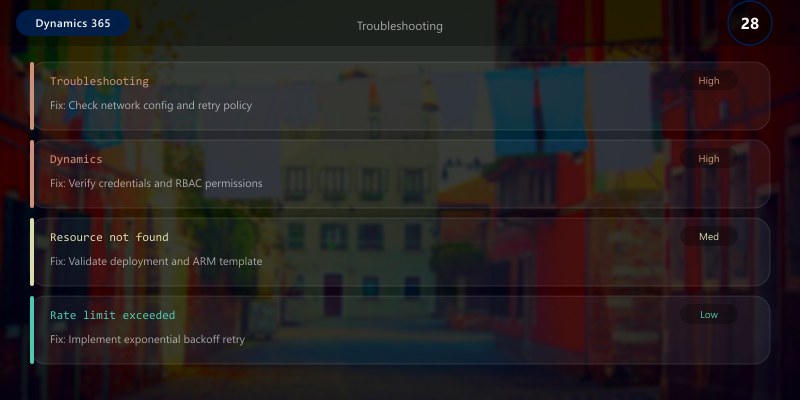
- Verify access token is valid and not expired
- Check application user has required security roles
- Confirm API permissions granted in Azure AD
403 Forbidden:
- User lacks privileges for requested operation
- Check security role assignments on application user
429 Too Many Requests:
- Implement exponential backoff
- Reduce request frequency
- Use batch operations to consolidate calls
Architecture Decision and Tradeoffs
When designing business applications solutions with Dynamics 365, consider these key architectural trade-offs:
| Approach | Best For | Tradeoff |
|---|---|---|
| Managed / platform service | Rapid delivery, reduced ops burden | Less customisation, potential vendor lock-in |
| Custom / self-hosted | Full control, advanced tuning | Higher operational overhead and cost |
Recommendation: Start with the managed approach for most workloads and move to custom only when specific requirements demand it.
Validation and Versioning
- Last validated: April 2026
- Validate examples against your tenant, region, and SKU constraints before production rollout.
- Keep module, CLI, and SDK versions pinned in automation pipelines and review quarterly.
Security and Governance Considerations
- Apply least-privilege access using RBAC roles and just-in-time elevation for admin tasks.
- Store secrets in managed secret stores and avoid embedding credentials in scripts or source files.
- Enable audit logging, data protection policies, and periodic access reviews for regulated workloads.
Cost and Performance Notes
- Define budgets and alerts, then monitor usage and cost trends continuously after go-live.
- Baseline performance with synthetic and real-user checks before and after major changes.
- Scale resources with measured thresholds and revisit sizing after usage pattern changes.
Official Microsoft References
- https://learn.microsoft.com/dynamics365/
- https://learn.microsoft.com/power-platform/admin/
- https://learn.microsoft.com/power-platform/alm/
Public Examples from Official Sources
- These examples are sourced from official public Microsoft documentation and sample repositories.
- Documentation examples: https://learn.microsoft.com/dynamics365/
- Sample repositories: https://github.com/microsoft/PowerApps-Samples
- Prefer adapting these examples to your tenant, subscriptions, and governance requirements before production use.
Key Takeaways
- Dataverse Web API provides RESTful access to all Dynamics 365 data
- OAuth 2.0 service principal authentication enables secure integrations
- OData queries support advanced filtering, expansion, and aggregation
- Batch operations reduce network overhead by 90%+
- Change tracking and webhooks enable efficient real-time synchronization
- Azure Service Bus decouples systems for reliable asynchronous messaging
Next Steps
- Implement API rate limit monitoring with Application Insights
- Use Azure API Management for throttling and caching
- Explore dual-write for Finance & Operations integration
- Add retry policies with Polly library
Additional Resources
Connect everything, reliably.
